AI foreign language reading companion and Anki cards
After finishing my 30th study session with Inch 3, I flipped back to page one of 9 Nyawa—and it was a little embarrassing. Most of the words and phrases I had looked up in the dictionary, and had the companion patiently walk me through, I could no longer recognise.
That little detour confirmed something I already suspected: reading on its own isn’t enough to make new vocabulary stick. I needed to actually review the words I had looked up. And of all the tools that can do that job, Anki is still the best fit.
I had two conditions for picking Anki back up:
- Only 5 new cards per day. I do not want to spend most of my study time drilling vocabulary. If 5 still turns out to be too many, I will dial it down further. Anki’s default of 20 new cards a day is way too much for me.
- The cost of making a card has to be close to zero. I have tried building Anki decks by hand before, and over time the card-making itself ended up eating most of my language-learning time. Completely backwards.
So I added a feature to Inch 3: while I am reading, the companion quietly stashes away any word worth remembering; then, whenever I decide it is time to make cards, a single command ships the whole batch—audio and all—straight into Anki.
The feature has three stages: capture, export, and prune. They’re independent of each other—capture runs in the background automatically when I have study sessions, while export and prune are skills I trigger by hand.
Before going further, a quick note on how Inch 3 is put together. The tool has no app UI and no always-on cloud server. The whole thing is driven by Claude Code.
Every feature in Inch 3 is just a plain-text “skill manual” with a flowchart in it, telling Claude what to do in what order: which commands to run, which queries to send where, how to handle errors. Claude reads the manual and follows it. All the learning records—which book I’m reading, how far into it I am, which phrases tripped me up—live in a SQLite database.
Capture isn’t a standalone action; it piggybacks on the normal reading flow. Whenever I type Please translate or Please explain into Telegram, Inch 3 quietly writes the current phrase and its translation into the database.
The export skill is called /inch-export-anki-cards, and by design it only runs when I invoke it explicitly. The first thing it does is not start building cards—it lists every captured phrase still waiting to be exported, so I can eyeball the list before anything actually ships.
For each captured phrase, the export step creates two cards in Anki. Both of them are recognition cards: I do not have to type the phrase or say it out loud—recognising it in my head counts as a pass.
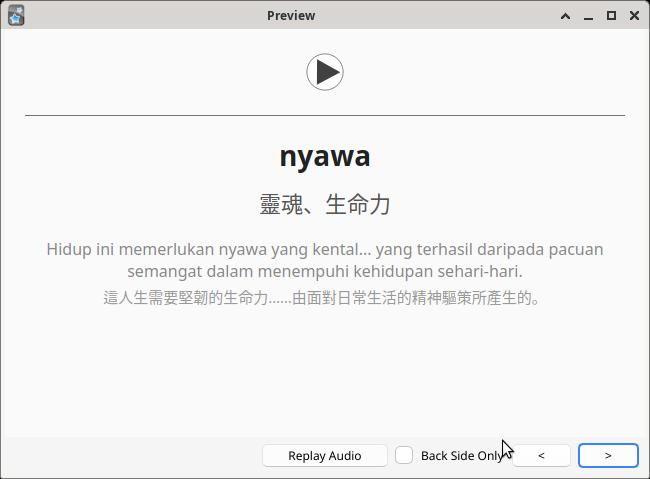
- Card A: The front is a single pre-merged audio clip, with no text at all: the full foreign-language sentence, a two-second pause, then the target phrase on its own. My job is to recall what the phrase means in Chinese.
- Card B: The front plays the same full-sentence audio and shows the Chinese translation of the phrase. My job is to recall the original foreign wording.
The two cards share the same audio and the same sentence, so every phrase gets quizzed from two angles: once as “can you recognise it from sound alone?” and once as “given the meaning, can you pick it out of the sentence you just heard?”. What I deliberately did not build is a production card—the kind where Anki shows you the Chinese and expects you to produce the foreign phrase yourself, by typing it or saying it aloud. The reason is simple: any given Chinese meaning can be translated back into the foreign language in several valid ways, and if I drill myself on one specific translation day after day, review stops being a language test and turns into a reflex test. I would just be memorising which exact string of characters goes with which prompt.
Prune is a separate skill: /inch-prune-anki. Its job is to pull the review statistics back from Anki, find the cards I have clearly learned and do not need to keep seeing (review interval ≥ 1.5 years), and delete them from both Anki and Inch 3.
Development went smoothly. Claude Code turned my notes into a skill manual, walked me through setting up AnkiConnect, and before long 134 cards—each with its own audio clip—had shown up in my deck.
Inch 3 - msa deck in Anki
It really was that easy!